
Purchase of a qualified electronic signature
You can pay for your qualified electronic signature using one of two trusted providers (VAT invoice included in both cases):
-
Stripe: payment by debit/credit card directly within the process window.
-
PayU: payments via BLIK, debit/credit card, fast bank transfers, Apple Pay, Google Pay, and Visa Mobile.
👉 👉 [Select and purchase a qualified signature - LINK]
Purchase of Autenti plans (e.g., eSign PRO/PREMIUM)
Renewable subscription
-
A payment card must be linked to the account.
-
The fee is charged automatically every month/year, ensuring service continuity.
One-time annual payment
Fast payments without linking a card permanently:
-
Card (VISA / Mastercard)
-
Transfer (fast online bank transfer)
-
BLIK (code from your banking app)
-
Digital Wallets: Apple Pay, Google Pay, Visa Mobile
-
Buy Now Pay Later / Installments: Pay later (Twisto / BLIK), PragmaPay (for business)
QR code payments for Czech customers
Applies to the purchase of one-time plans (non-renewable) in CZK. With QR code payments, customers can complete their purchase quickly and smoothly using a familiar local payment method.
Instructions (4 steps):
-
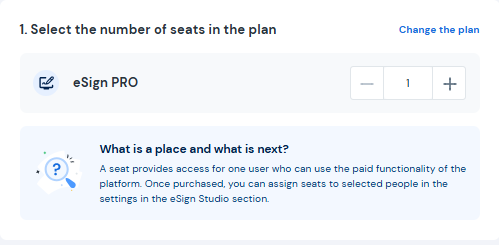
Select your plan and the number of seats in Autenti.
-
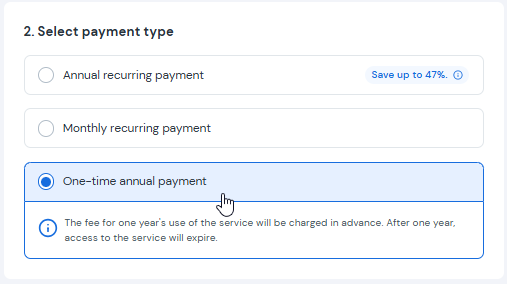
Choose "One-time annual payment".
-
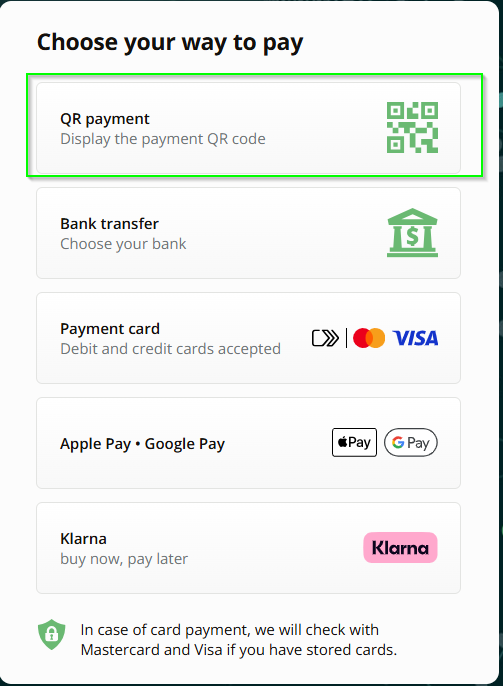
On the checkout screen, select QR code payment.
-
Scan the QR code with your Czech bank's mobile app and confirm the transaction.