
Step-by-step instructions:
- Log in to your user panel.
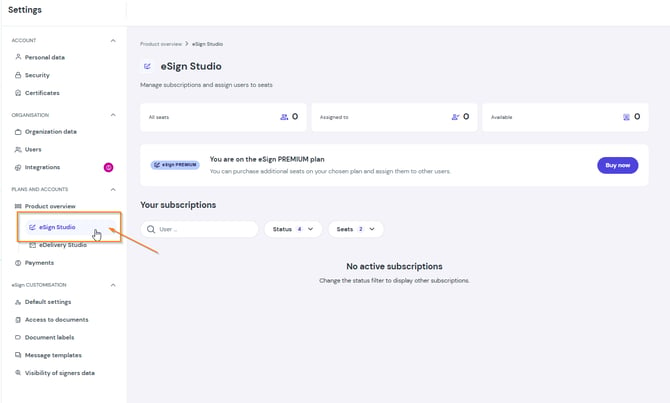
- Go to Product Overview > eSign Studio.
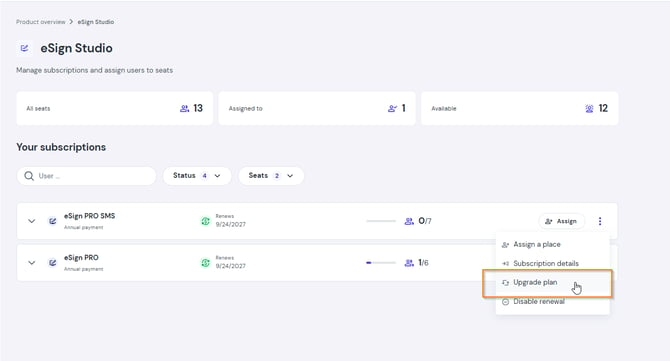
- Find the subscription you want to upgrade and click Upgrade plan.
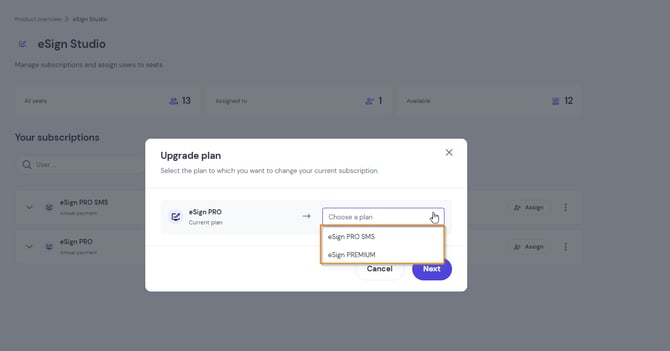
- Select the new plan from the list and confirm the action.
Billing rules and effects of upgrading:
- Immediate access: Your new limits and features are activated as soon as the payment is confirmed.
- Pro-rated adjustment (paying the difference): The system automatically calculates the unused amount from your current plan and charges you only for the price difference for the remainder of the current billing cycle.
- VAT invoice: A new invoice for the adjusted amount will be sent automatically to your email address.
- Next billing cycle: Starting from the next billing cycle, your card will be automatically charged the full amount for the new, upgraded plan.
Important: Upgrading your plan cancels any previously applied promotional discounts. The system calculates the pro-rated difference by subtracting the actual amount paid for your current cycle from the standard price of the upgraded plan, based on the number of days remaining.