
Key rules
- Required signature type: A document with existing signatures can only be signed with an Autenti e-signature or a qualified electronic signature (QES).
- One signed file per process: Each signing process can contain only one file with existing signatures.
-
Automatic Multi-File Splitting: If you upload multiple files at once and at least one of them already contains a signature, the system will automatically separate them into individual workflows:
- Selects and locks the option: Send each file in a separate signing process.
- Names each document identically to its original uploaded file name.
- Creates a separate process for each document, retaining identical recipients and settings.
- Feature availability: Available at no extra cost from the eSign PRO plan and higher.
Step-by-step: How to send the document
Step 1: Upload the document
Upload your file in the sending form. The system checks it automatically-if digital signatures are detected, the file will be tagged as With signature 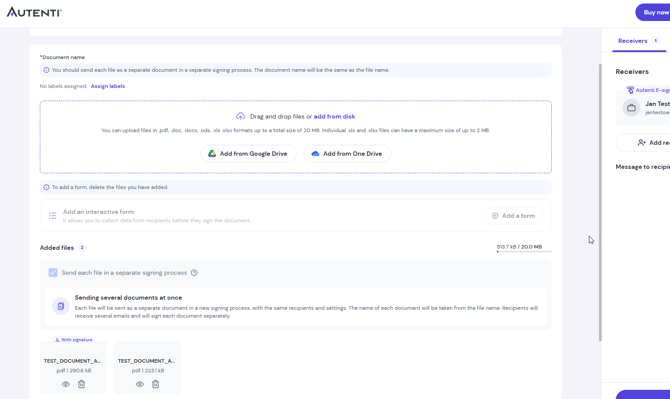
Step 2: Set signature placement
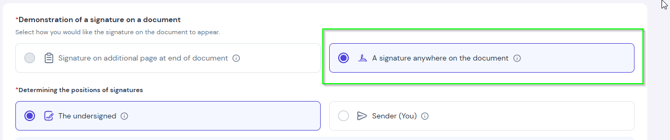
In the Demonstration of a signature on a document section, select:
- A signature anywhere on the document
Step 3: Choose who places the signatures
In the Determining the positions of signatures section, choose one of the options:
- Signer - the recipient chooses where to place their signature.
- Sender (You) - you place the signature fields on the document before sending. Make sure the new fields do not cover any existing signatures or seals.

Step 4: Add recipients and send
- Enter the details of the signers and any recipients who only need viewing access.
- Review the details and click Send.
⚠️ When can a file NOT be signed again?
If you see a red banner after uploading the file with the message: “The file contains a signature card (or a Level 1 certified signature) and cannot be signed again.”
This means that:
- The document is already sealed with a final Signature Card (for example, after completing a previous signing process on Autenti).
- The file contains a Level 1 certification, which blocks any further changes or signatures.