Key Requirements
You will gain access to shared documents once two conditions are met:
- Subscription Plan: An active eSign PREMIUM plan is required.
- Account Permissions: You must have at least one of the following permissions:
- Access to documents: access to all documents granted across the organization, OR
- Moderator role: Moderator permissions assigned to a specific document label.
Where to Find Shared Documents
Once your account meets the requirements:
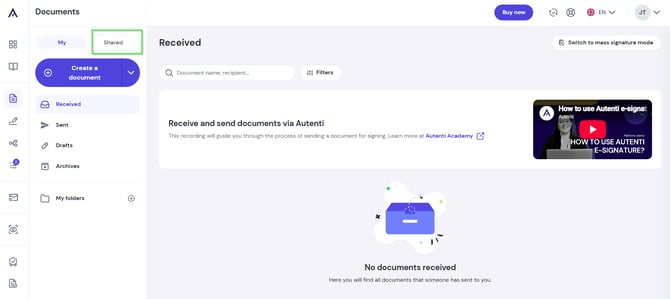
- In the left navigation panel, under the Documents section, locate the view toggle above the “Create a document” button: My and Shared.
- Click the Shared tab to view organization-wide documents or documents assigned to the labels you moderate.
What to Do if You Still Can’t See Shared Documents
- Verify account plan: Make sure you have an active PREMIUM plan.
- Check permissions: Contact your Super Administrator to confirm that you have been granted organization-wide access or assigned the Moderator role for the relevant labels.
- Refresh your session: Log out of the platform and log back in to update permissions in your browser.