
Requirements for forwarding a document
Forwarding a document is possible only when the following conditions are met:
- Company membership – the person receiving the document must have an active Autenti account within your company organization.
- Matching signature type – the new recipient must sign using the exact same signature type required from the original recipient (Autenti e-signature or Qualified Electronic Signature - QES).
- No signing order – this feature is available exclusively for documents that do not have a set signing order.
Important: By forwarding a document, you relinquish your right to sign it. From that moment on, you will only maintain preview access to the document.
How to forward a document step by step
- Open the document menu
Go to your document list and click the three vertical dots icon on the right side of the document tile.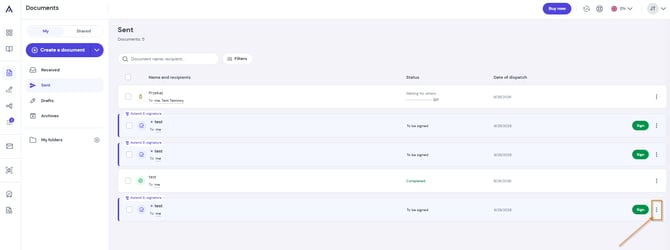
- Select the forward option
From the drop-down menu, click Forward. 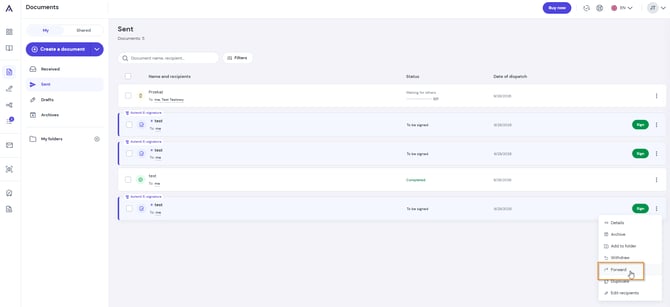 Enter the new recipient
Type the email address of the team member you wish to forward the document to, then click Forward to confirm.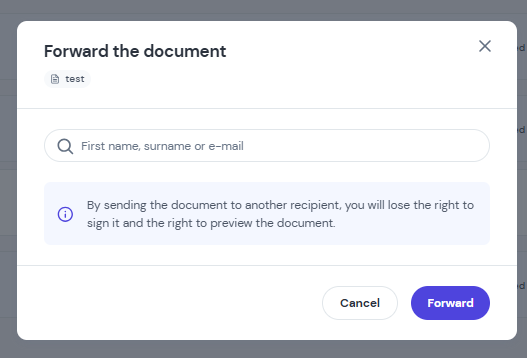
Done! The document has been successfully forwarded to the new recipient.