
How does signing order work in practice?
- Signing order enabled: Each recipient receives an email request only after the previous person completes their action (signs or initials the document).
- Signing order disabled: All recipients receive the email request at the same time.
How to enable and configure the signing order
Setting a signing order is possible once you have added at least two recipients to the process.
- Add recipients
Add all required recipients while creating a new process.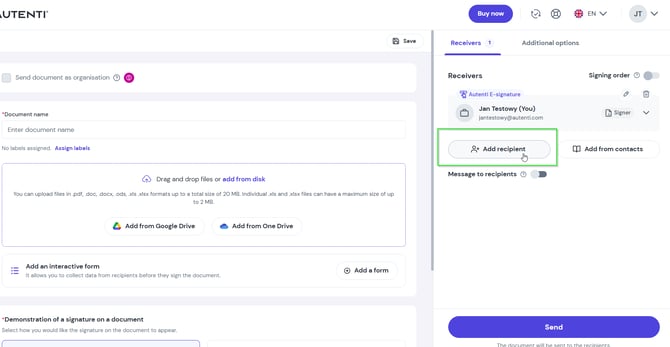
- Enable the order option
Go to the Signing order section and toggle the switch on.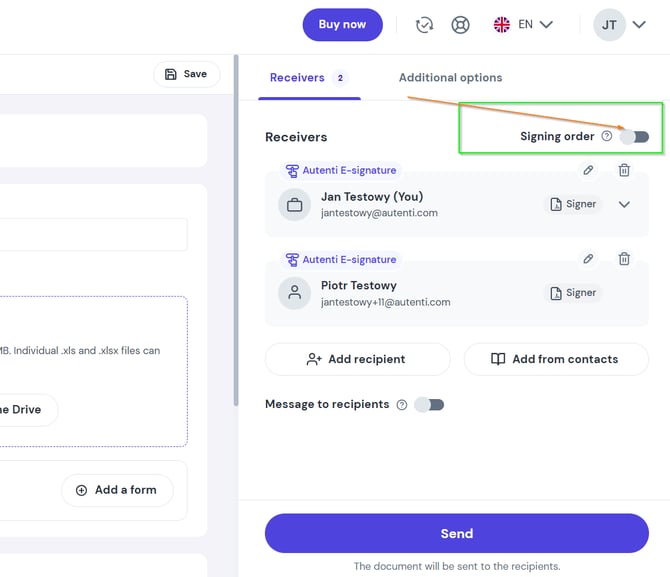
- Set the desired sequence
Drag and drop the handle icon next to a recipient's name to move them up or down the list.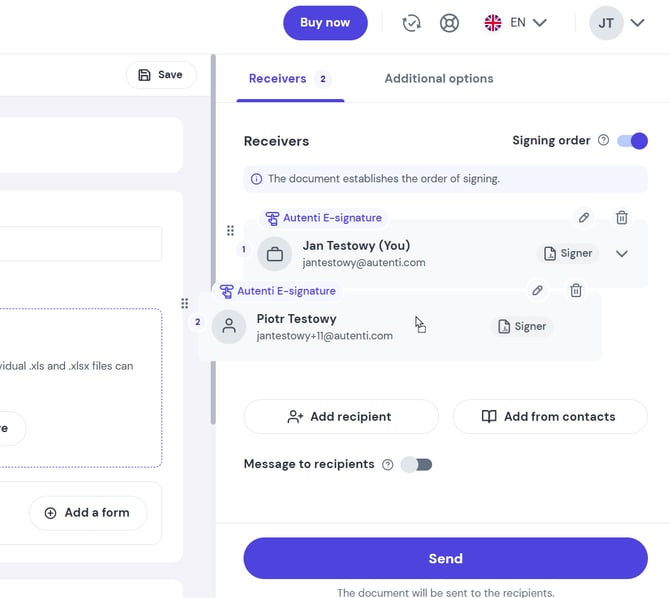
Rules and exceptions by recipient role
The system's behavior depends on the role assigned to each recipient:
- Approver
- Mandatory sequence: Adding a recipient as an Initialer automatically enforces the signing order feature.
- Position restriction: An Approver cannot be placed last in the queue - they must approve the document before the final signatures are submitted by Signers.
- Reviewer and Viewer
- Recipients with these roles operate outside the defined sequence.
- They receive the email notification with the document immediately once the process is launched, regardless of the stage reached by Signers or Initialers.
Managing signing order via API
The signing order works the same way for system integrations via API. You can define the sequence of recipients directly in the query that creates the process.
For developer guidelines and implementation examples, refer to our complete [API documentation].
❓ Frequently asked questions and troubleshooting
Can I assign two recipients to the same step in the sequence?
No. The signing order works step by step, meaning each person has a unique spot in line. If you want two people to receive the document at the same time, disable the signing order (the document will then go to all recipients at once).
Why is the toggle switch inactive?
This option becomes active only after you have added at least two recipients to the process.
Why can't I place an Approver at the end of the list?
Approval serves to verify and approve content prior to its final execution; therefore, the system requires this step to occur before the final signature is placed.