
How to withdraw a document step by step?
- Select the document:
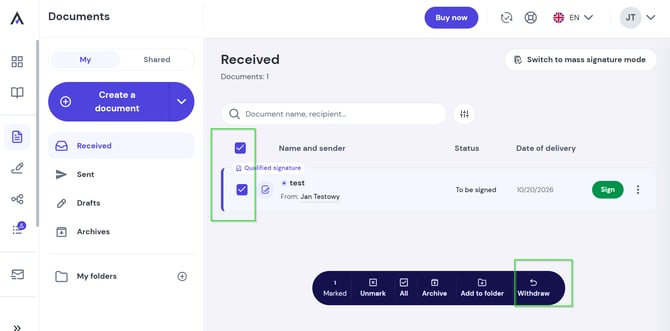
- Bulk action: Select the chosen documents from the list and choose the Withdraw option from the menu at the bottom of the screen.
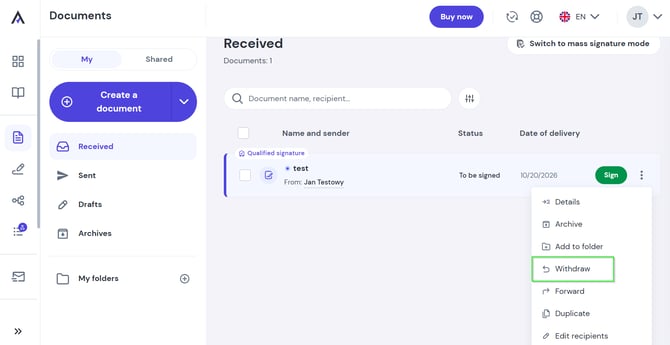
- Single document: Click the three dots icon on the right side of the selected document and choose Withdraw.
- Bulk action: Select the chosen documents from the list and choose the Withdraw option from the menu at the bottom of the screen.
- Confirm your decision:
If you are sure you want to cancel the process, click the Withdraw document button.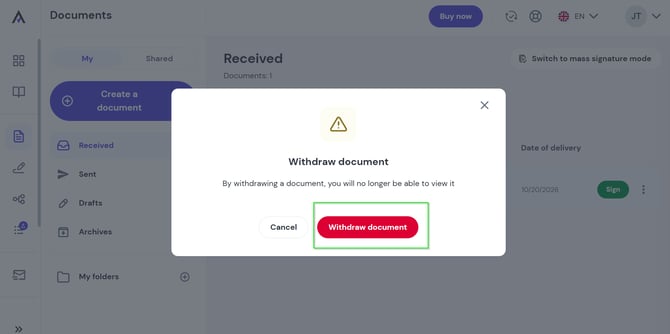
- Done! The document has been successfully withdrawn.
What happens after withdrawing a document?
- None of the added recipients will be able to sign or view the withdrawn document anymore.
- All recipients will receive an email notification informing them that the document has been withdrawn by the sender.
⚠️ Important: If all recipients have already signed, the document has been formally concluded and cannot be withdrawn.
See also: