Who has access to shared documents?
Documents in this section are visible exclusively to users with an eSign PREMIUM plan who have been granted the appropriate permissions:
- Access to a selected label – allows users to view, download, and withdraw documents marked with a specific label, as well as apply that label when sending new files.
- Access to all organization documents – enables users to view and download all company documents, withdraw them from circulation, and send reminders to recipients.
How to get or grant access to shared documents?
- Log in to your Autenti account.
- Make sure you have an active eSign PREMIUM plan.
- Grant or obtain access to documents:
If you are a Super Administrator:
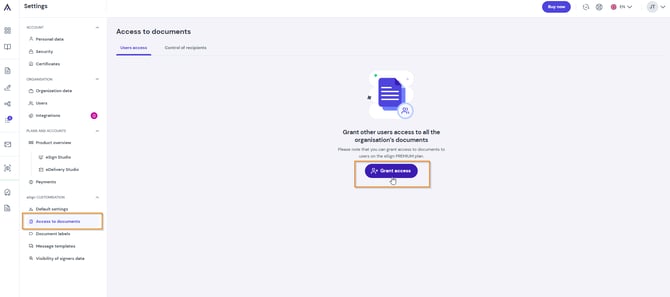
Go to Settings to configure permissions based on the required level of access:
- Access to all organization documents: Go to the Access to documents tab and select the users who should receive full visibility of the company’s documentation.
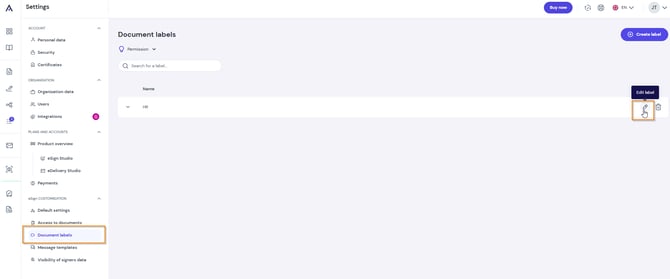
- Access to selected labels (e.g., HR Department, Commercial Contracts)
- Go to the Document Labels tab.
- Find the relevant label on the list and click the pencil icon (Edit label).
- In the Edit a shared label window, assign one of the following roles to the selected user:
- Owner – full label management and access to documents assigned to it.
- Moderator – viewing and downloading documents, as well as withdrawing them from circulation.
- Sender – ability to apply the given label when sending new files.
If you are not a Super Administrator:
Ask your company account's Super Administrator to grant you organization-wide access or assign you an appropriate role within a selected label.
Where to find shared documents?
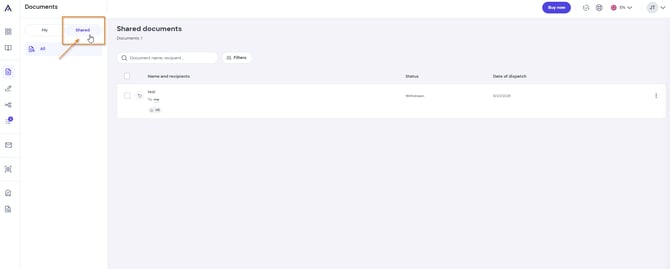
Once permissions are granted, go to the Shared tab in the menu on the left side of the screen. You will find all organization documents and files assigned to the labels you have access to there.
Important: The Shared tab and access management features are visible exclusively to users with an active eSign PREMIUM plan.