What happens when a document is rejected?
- Cancellation of the process: The signing process is immediately interrupted and completed.
- No further signatures: None of the remaining participants will be able to sign this document.
How to check the reason for rejection?
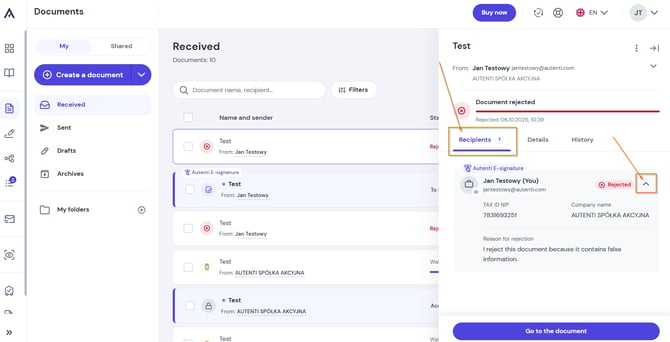
When rejecting a document, the recipient is required to provide a reason. The provided comment is visible to other participants in the process.
To check the reason for rejection:
- Open the rejected document on the Autenti platform.
- Go to the Recipients section on the right side of the screen.
- Click the arrow icon (∨) next to the recipient who rejected the document to expand the details and view their comment.