
1. Verify the email address
Check if there are any typos or syntax errors in the recipient’s email address.
2. Check the signing order
Confirm whether a sequential signing workflow is enabled for this document:
- If workflow order is active, the next person in line receives the notification only after the previous signer completes their action.
3. Ask the recipient to check all email folders
Automated emails can occasionally be filtered. Ask the recipient to inspect:
- Spam / Junk
- Promotions / Updates
- Trash / Archive
How to send a reminder
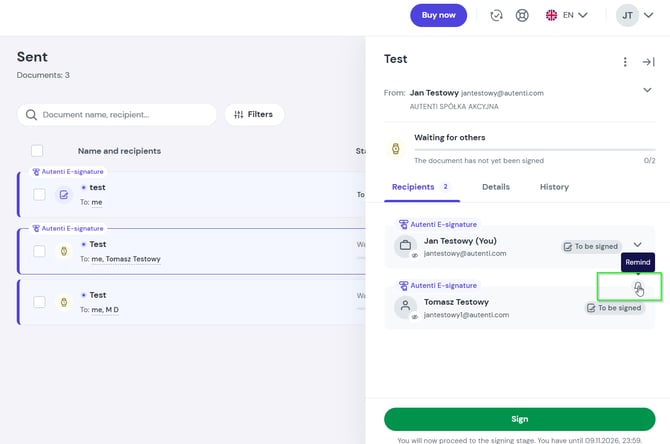
Sending a reminder automatically re-sends the email notification containing the signing link.
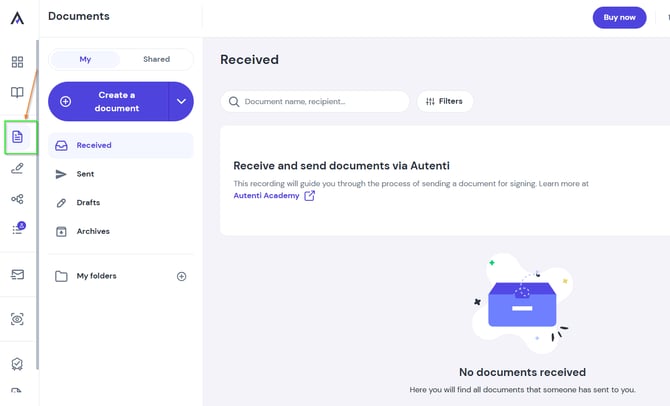
- Go to the Documents tab.
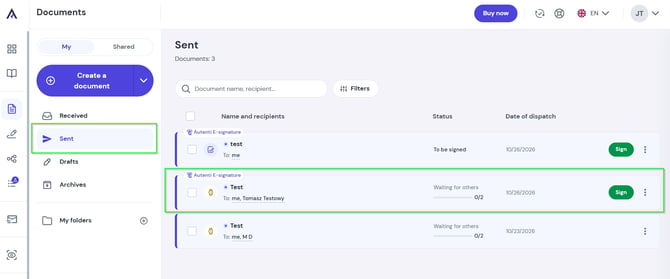
- Select the relevant document.
- Next to the recipient’s name, click the bell icon - Remind.
Still need assistance?
If the recipient still cannot access the email, reach out to our Support Team with the Document ID and the recipient’s email address:
- ✉️ Email: support@autenti.com
- 💬 Live Chat: click the chat icon in the lower-right corner of the screen